
What if I don’t have my customer number and security PIN to log in?
If you do not have your log in details, please contact
[email protected]
with ‘Request for customer login details’ in the subject line. If you have forgotten your PIN, click on ‘Forgotten your PIN?’ highlighted below and we will send it to you immediately via email.

What do I do if I want to change my ship to and/or my despatch address?
If you would like to make any changes to your address details on your account, you can now make these changes yourself once you have logged into your account or please contact us via [email protected] with ‘Request to change customer address’ in the subject line. Please allow up to 48 hours for the changes to be reflected.
I cannot pay with a pro-forma invoice - how can I request a tax invoice?
You can now request a tax invoice once you have logged into your account and add a new purchase order, where required or please contact [email protected] with ‘I would like a tax invoice’ in the subject line.
Is auto-renewal an option?
Yes, currently autorenewal is an option when you choose to renew choosing to pay via a tax invoice. Once you have selected auto-renewal, you will receive an email confirmation and for your next renewal, you will be sent a statement 90 days before your expiry date.
What does a journal subscription include?
Most print or online subscriptions are for the calendar year, January–December. This is also sometimes referred to as the 'volume year'. or shown as ‘period’ beside your orders on the payment site. For further details on what’s included on our different subscription rates please click here
If I cancel my subscription, will I receive a refund?
No refunds will be given after the first issue of the journal for the year has been despatched for print subscriptions and after the 28th of February (current year) for online-only subscriptions .
I have cancelled my subscription but want to resubscribe, how can I do this?
If you would like to resubscribe to your previously cancelled orders, please contact
[email protected]
with ‘Request to re-order my subscription for order number (add order number)’ in the subject line.
I paid my subscriptions fees, but this is not showing on the secure payment site, what should I do?
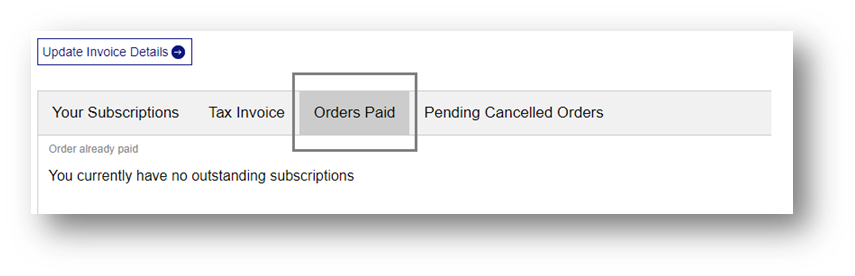
Please allow 24 hours for your renewal to show on the secure payment site under the orders paid tab shown below, if this does not appear please contact
[email protected]
with your customer number, journal title & mode of payment.
Why I am still being chased to renew my order when I have already paid?
Where renewal payments have been sent via cheque or payment transfers, please allow up to 5 working days for these to be processed. During this time, renewal reminders will continue to be automatically sent from our system;please ignore these reminders if you have recently paid.
How do I claim for a missing issue?
Claims for issues not received should be made in writing and within 12 months of publication, or since the last valid claim, whichever was most recent. To claim, please complete our online web form here . Please include the full title of the journal you are missing, the year, volume and issue number. Also, your full name, address and customer account/order number. For further information on estimated delivery times please click here
How do I access my personal or society subscription online?
Online access to the journal content is available via Taylor & Francis Online . If your personal subscription includes online access, you will be sent instructions on how to register once your order has been processed or you can find further information here . For details on how to make the most of your online access, visit the Taylor & Francis Online Help Centre here .
I’ve registered, but my account has not been activated. What should I do?
Once you've submitted your registration, we'll send a confirmation email to the email address you gave us. This message includes a validation link that you need to click on to activate your account and this needs to be completed within an hour of receipt of the email.
Unfortunately, these confirmation emails can sometimes be caught in spam filters. So, please check for the email in your spam folder and [email protected] your safe sender list.
How do I activate my institution’s online subscription?
If you manage your institution’s online access, you will need to create an individual account on Taylor & Francis Online and have it linked to your institution’s subscriptions. We recommend using a generic library address in case an administrator leaves, the new administrator can change the password and not have to create a new account. For further details on how to do this, here are a few links to help:
How do I update my institution’s IP ranges?
Do you support Athens and how do I update my institution’s account?
Do you support Shibboleth and how do I update my institution’s account?
What are the available authentication options?
How do I run usage reports on my institution’s account?
How do I set up Link Resolvers?
How do I show my institution’s logo on Taylor & Francis Online?
How do I set up an additional Administrator Account?
How can I access online access to previous volume years?
Access to back volumes is also available via our Online Journal Archive products
What happens to our Institutions access if we don’t renew our subscription?
If your subscription has lapsed, you will retain access to the years to which you subscribed. For example, a subscription in 2010 will mean you retain access to the 2010 content in perpetuity. Access to the archive will be restored once your payment has been processed.
How do I purchase a new subscription?
For details on how to purchase a new subscription please click here